
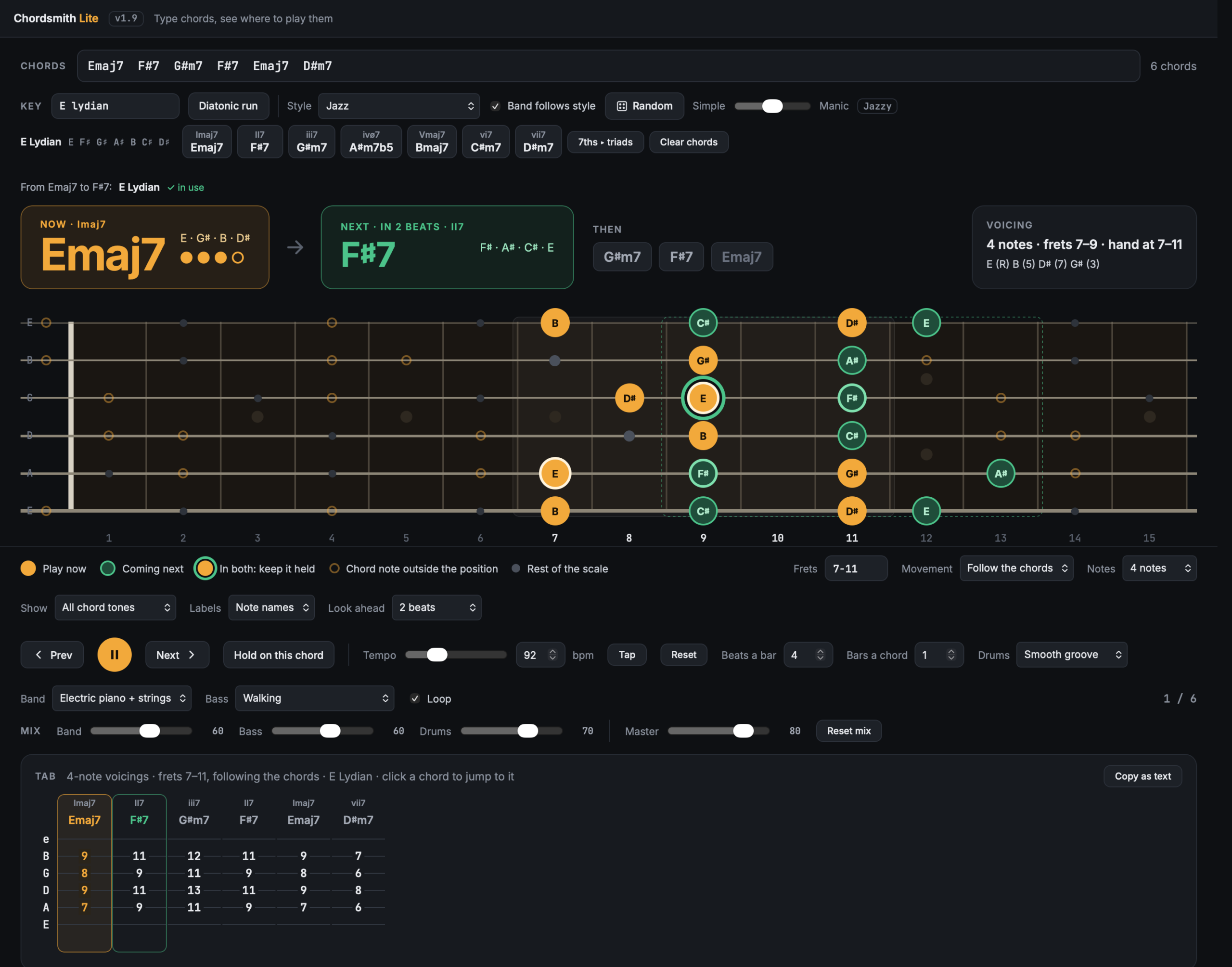
Chordsmith Lite started as a simple idea: type in some chords and see where to play them. It’s grown into a small practice companion for working on chords, voice leading and modes, and it’s the little sibling of Chordsmith. Where Chordsmith takes a recorded song apart, Lite starts from nothing: you type the chords, or let it make some up, and it shows you what to play, where, and why.
It runs on your own computer, on Mac and Windows. It’s tiny (well under a megabyte), it doesn’t need an account or an internet connection, and it’s free.
See every chord on the neck
Type any progression, from G Em C D to G13, Bm7b5, Fmaj9#11, A7#9 or D6/9. It understands extended, altered and slash chords, in capitals or lower case, and shows you:
- The chord you’re playing now in amber, with the root marked.
- The next chord in green before it arrives, so you can see the change coming.
- The notes the two chords share, ringed in both colours, so you know which fingers can stay where they are.
- Every note named, or shown as intervals (R, 3, b7, 9) if you’d rather think that way.
There’s also an overlay that puts every chord in the progression on the neck at once, each in its own colour, so you can see how the shapes connect.
Tab for every voicing, in the position you choose
Type a hand position, say frets 5 to 9, 7 to 11, anywhere up to the 22nd fret, or the whole neck, and it works out playable voicings that stay there and move as little as possible from one chord to the next. That’s voice leading done for you, so you can see how it works. Choose triads, or ask for 4, 5 or 6-note voicings so a G13 actually gets its 13th. When the notes can’t all fit under one hand, it tells you which ones it left out (the 5th first, then the root). The tab is always on screen, and you can copy it as text.
Built for practising modes
Type a key and mode (E Lydian, D Dorian, A Phrygian dominant, E Mixolydian b6, even the altered scale) and Chordsmith Lite:
- shows the mode’s notes and its seven chords, which you can click to build your own pattern;
- labels every chord with its numeral (I, ii7, vii7 and so on) and marks any chord that falls outside the key;
- tells you which mode your first two chords suggest: E then F# is E Lydian;
- has a Follow the chords setting that slides your hand position along the neck with each chord. A step up the scale is two frets up the neck, so in E Lydian, with E at the 7th fret, F# moves to the 9th and D#m7 drops to the 6th. You can practise the same lines in one place, and then again moving up and down the fretboard.
A backing band that plays along
Press play and a small built-in band loops your chords: electric piano over soft strings, a bass line and drums. It’s all made by the app itself, with no samples, which is why it’s so small.
- Grooves: smooth, fusion shuffle, blues shuffle, jazz swing, funk, bossa nova, reggae, rock, metal, country, ballad and waltz.
- Bass: walking, boogie, sustained roots, quarters, eighths, octaves, tresillo and more.
- Your own mix: a fader each for the band, bass and drums.
- Tempo: a slider, tap tempo, beats a bar and bars a chord, with the beat counted out on screen.
Never run out of ideas
Press Random for a new progression in Pop, Rock, Blues (proper 12-bars, up to jazz blues), Jazz (ii-V-Is up to Coltrane-style cycles), Classical, Funk, Bossa nova, Folk and country, Gospel and soul, Metal, Flamenco, Reggae, or a modal vamp. A slider takes it from Simple to Manic, and the band changes to suit the style. Set a key and the random chords stay in it, so you can drill one mode for as long as you like.
Downloads
It’s free to download and use. Both are version 1.9. It’s new and still growing, so you may hit the odd rough edge; if you do, I’d like to hear about it.
- Chordsmith Lite for Mac (version 1.9, Apple Silicon: M1 and newer, 250 KB). Open the file and drag Chordsmith Lite into Applications. The first time, right-click it and choose Open, because it isn’t from the App Store.
- Chordsmith Lite for Windows (version 1.9, Windows 10 and 11, 55 KB). Unzip it, keep the files together, and double-click Start Chordsmith Lite. It opens in its own window using Microsoft Edge, which comes with Windows. If Windows asks whether to run a file from the internet, say yes.
Whether you’re learning your first chord changes, working on smooth voice leading or getting your head round modes, I hope it helps.