
Years ago there was some really good software that blocked cookies and stopped websites tracking you around the internet. You switched it on and the web just left you alone. That kind of thing still exists, but tracking has moved on a lot since then, and most of today’s blockers either only deal with adverts or give you a hundred switches you don’t understand. So I made my own: Leave Me Alone, a free extension for Chrome and the other browsers built on the same engine (Edge, Brave, Opera, Arc and Vivaldi).
How websites follow you around
Cookies are only part of it now. When you open a typical news site, your browser quietly contacts dozens of other companies as well: advertising networks, analytics firms, “data brokers” who build profiles of people and sell them. Each of them learns which page you’re reading. They follow you from site to site in several ways:
- Third-party cookies. A small file one company leaves in your browser and reads back on every other site that uses it.
- Tagged links. The bits stuck on the end of links, like
?utm_source=orfbclid=, that tell a site exactly where you came from. - Redirect links. Google, Facebook and YouTube often send your click through their own servers first, so they can record it.
- Fingerprinting. The sneaky one. Every computer draws text and graphics very slightly differently, and has its own mix of screen size, graphics card and so on. A site can measure all that and recognise you again without storing anything at all, so clearing your cookies doesn’t help.
- Session recording. Some sites record every mouse movement, scroll and keypress so they can replay your visit later.
Five levels, set per site
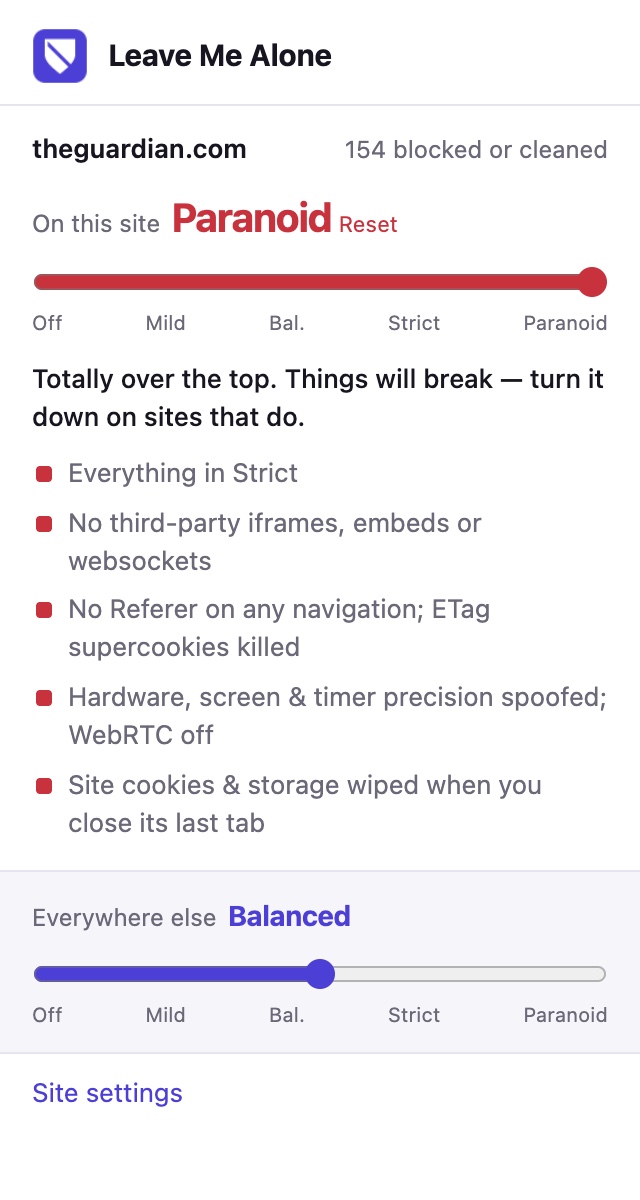
Instead of a page of settings, Leave Me Alone has one slider with five levels. Each level does everything the one before it does, plus a bit more:
- Off. Nothing. You’re on your own.
- Mild. Blocks about 200 of the biggest advertising and analytics companies, strips the tracking tags off links (including links you copy to send to someone), takes Google, Facebook and YouTube’s redirects out of links, and tells every site you don’t want to be tracked or have your data sold. Almost nothing breaks.
- Balanced (the default). Other companies’ cookies are stripped out completely, they aren’t told which page you were on, and their tracking “pings” are blocked. This is the one I’d leave it on.
- Strict. Also blocks session recorders, fingerprinting companies and social media buttons that report back. It adds tiny invisible changes to your computer’s fingerprint that are different on every site, so sites can’t compare notes and match you up. It also hides your graphics card and battery level, and stops video-calling features giving away your real internet address. The odd site may misbehave.
- Paranoid. Totally over the top, and things will break. No embedded videos, chat boxes or anything else from other companies at all. It fakes your computer’s details and turns off video calling in the browser. When you close the last tab for a site, it wipes everything that site stored on your computer.
You can also give any site its own level. The popup has two sliders: one for the site you’re on and one for everywhere else. So you can put a news site you don’t trust on Paranoid, your bank on Mild so nothing gets in the way, and leave everything else on Balanced. If a site stops working properly, slide it down, or all the way to Off. The Site settings page lists every site you’ve given its own level, and you can change or remove them there at any time.
What makes it different
- It’s fast. The blocking is handed to the browser’s own built-in blocker rather than checked by the extension one request at a time, so pages load as quickly as they did before, or quicker, since there’s less rubbish to download.
- It deals with fingerprinting properly. Rather than blocking the bits of the browser that fingerprinting uses, which breaks things and makes you stand out, it gives each website a slightly different, made-up version of you. A site sees the same “you” every time it looks that day, but no two sites see the same one.
- It doesn’t collect anything. There’s no account, no adverts, no “acceptable ads” deals and nothing sent anywhere. It all runs on your own computer.
- It’s tested. There’s an automatic test that loads it into Chrome and checks that every level really does what it says: trackers blocked, links cleaned, cookies stripped, fingerprints changed, and each site getting exactly the level you gave it.
Install it, it’s free
Leave Me Alone is free and open source. The code is on GitHub: github.com/Rickkendall/leave-me-alone. It isn’t in the Chrome Web Store yet, so for now you install it by hand. It takes a minute:
- On the GitHub page, click the green Code button, choose Download ZIP, and unzip it somewhere you’ll keep it, such as your Documents folder.
- In Chrome, type
chrome://extensionsin the address bar (oredge://extensionsin Edge,brave://extensionsin Brave) and turn on Developer mode in the top corner. - Click Load unpacked and choose the extension folder inside the one you unzipped.
- Click the jigsaw-piece icon in the toolbar and pin Leave Me Alone so the shield is always there.
Don’t move or delete the folder afterwards, because Chrome runs the extension from it. Chrome may show a note about developer-mode extensions now and then. That’s normal for anything installed this way, and you can dismiss it.
A word of honest advice
Leave Me Alone makes you much harder to follow, but it can’t make you invisible. Any site you log in to knows exactly who you are, and your internet provider can still see which sites you visit. Its list of trackers is hand-picked rather than the huge community lists some blockers use, so it catches the big players but not every small one. It goes happily alongside an ad blocker if you want one. And if you only change one thing, leave it on Balanced: that stops most of the tracking and almost never gets in your way.