
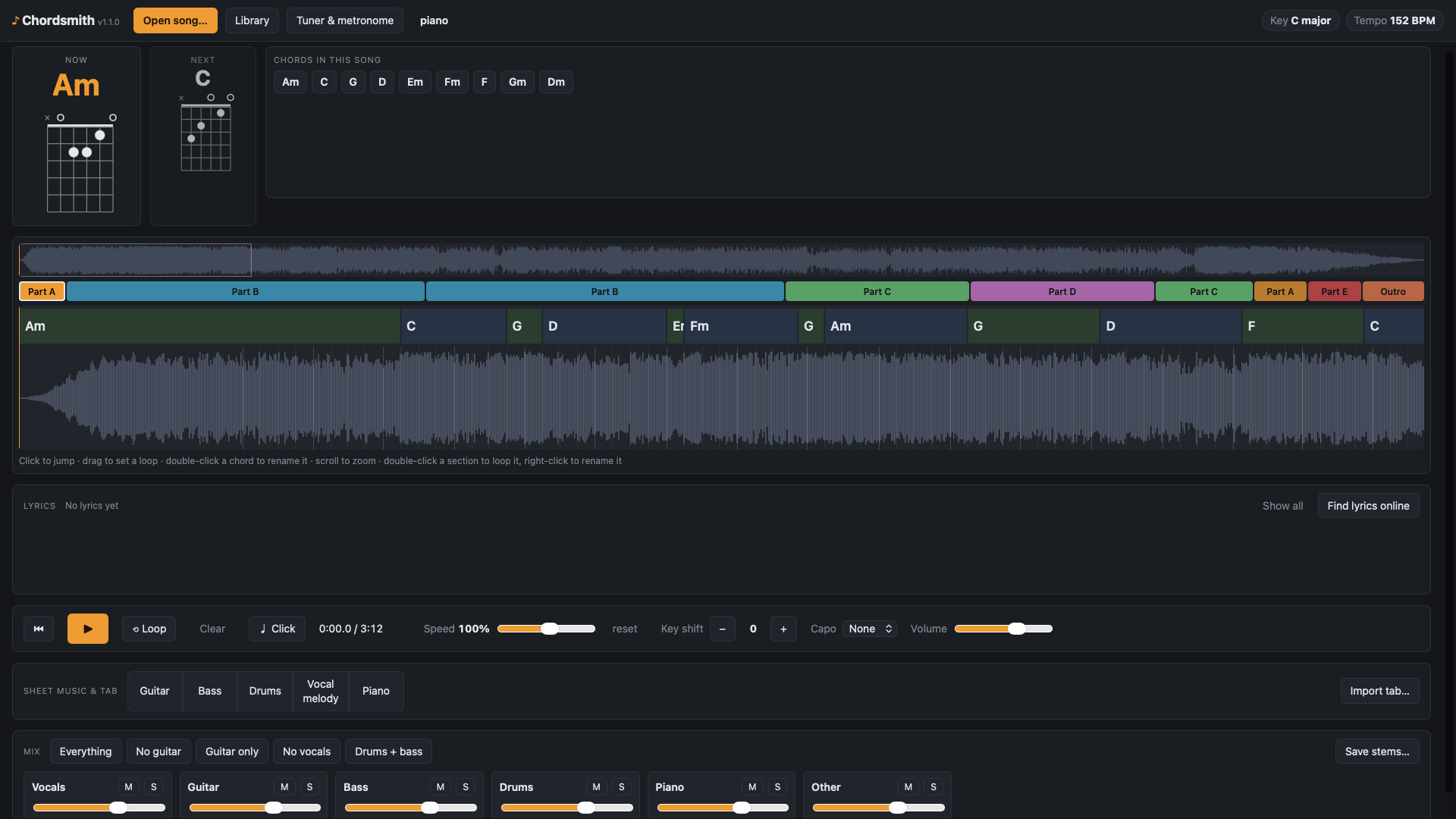
Learning a song by ear is the best way to get it into your fingers, and the most tedious. You play the same four seconds forty times, you can’t tell whether that’s an Am or a C, and the bass is buried under everything else. Chordsmith is the practice tool I wanted for that: load a song, and it takes it apart for you.
It runs on your own computer, on Windows and Mac. Your music never leaves it. And it’s free: no cost, no account, no subscription.
A warning: this is very much still a beta. It works, and I use it, but it’s unfinished. Some features may be added and some may be taken away as I go, and you may hit rough edges. As such, you install and use it at your own risk.
What it does
- Splits the song into parts. Vocals, guitar, bass, drums, piano and everything else, each on its own track. Mute the guitar and play along, or solo the bass to hear exactly what it’s doing.
- Finds the chords, key and tempo. The chords scroll past in time with the music, with guitar chord diagrams, and a capo setting that changes the shapes to the ones you’d actually play.
- Slows it down without changing the pitch. From 40 to 150 percent speed, or shift the key up and down by up to an octave.
- Loops any section. Drag across the timeline and it loops seamlessly, snapped to the beat. It also finds the verses, choruses and bridges, so you can loop a whole section in one click.
- Shows the lyrics in time. Either transcribed from the vocals, or fetched on request from an online lyrics database.
- Writes sheet music and tab. For guitar, bass, vocal melody and piano, plus drum tab.
- Import your own tabs. Got a Guitar Pro (.gp, .gpx, .gp3 to .gp5) or MusicXML tab of the song? Upload it, pick which of its tracks is the guitar, bass and drums, and Chordsmith keeps the tab’s notes and times its bars to your recording, repeats included. You can switch between your tab and the automatic transcription at any time. If the tab doesn’t match the recording, it’s refused rather than shown wrongly.
- Tuner and metronome. The tuner works with your audio interface and has the usual alternative tunings. The metronome clicks along with the song, following the speed and your loops.
- Saves stems. Export each part, or your own mix such as the song with no guitar, as WAV or FLAC.
Privacy
Everything is processed on your own machine. Two things go online: a one-time download of the lyrics model, and the optional “Find lyrics online” button, which sends only the artist, title and length of the song.
The catches
- It’s automatic, so it gets things wrong. Expect the chords to be right roughly 70 to 85 percent of the time on pop and rock. Distorted power chords usually show as major chords, and jazz voicings are hard. Double-click any chord to correct it. The sheet music is a good starting point for riffs and basslines, but busy distorted rhythm guitar comes out cluttered.
- Song structure is a guide. The sections are worked out from the lyrics, and lyrics downloaded online are lined up approximately, so a verse or chorus can start a little early or late. Right-click a section to rename it.
- Lyrics transcription is off on 8 GB Macs. The lyrics model needs more memory than such a Mac has to spare and made my M1 Air freeze, so from version 1.1.0 it’s switched off by default there. Online lyrics still work, and there’s a setting to switch transcription on if you want to try it.
- Speed. On a PC with an NVIDIA graphics card a three-minute song takes well under a minute. Without one it still works on the processor, just more slowly. Apple Silicon Macs use their own graphics hardware and take a few minutes a song.
- The installers aren’t signed. Windows will say it “protected your PC” the first time: click More info, then Run anyway. On a Mac, right-click the app and choose Open the first time.
Downloads
It’s free to download and use. The Windows and Apple Silicon versions are 1.1.0. The Windows download is big, because it includes the graphics card libraries that make processing fast.
- Chordsmith for Windows (version 1.1.0, large download). It comes as a zip: unzip it first, keep the files together in one folder, then run the installer inside.
- Chordsmith for Mac, Apple Silicon (version 1.1.0, M1 and newer)
- Chordsmith for Mac, Intel (version 1.0.0, so it has no lyrics change yet. I haven’t been able to test this on a real Intel Mac. It ran fine under Rosetta on an Apple Silicon one, but you’re a bit of a guinea pig. It uses the processor only, so expect it to be slow.)
- The user guide (PDF), which covers all versions
- The help page (a single HTML file you open in your browser)
If you try it and something doesn’t work, I’d like to hear about it.